mirror of
https://github.com/NoFxAiOS/nofx.git
synced 2026-07-11 14:56:57 +08:00
 c720d663f1
- Add TRANSPORT_ENCRYPTION env config (default: false)
- Allow HTTP/IP access when transport encryption is disabled
- Add /api/crypto/config endpoint to expose encryption status
- Update WebCryptoEnvironmentCheck with 'disabled' status
- Update ExchangeConfigModal and AITradersPage to allow form submission when disabled
- Add i18n translations for disabled status (EN/CN)
- Update README with two deployment modes documentation
324 lines
9.1 KiB
Markdown
324 lines
9.1 KiB
Markdown
# NOFX - AI 交易系统
|
||
|
||
[](https://golang.org/)
|
||
[](https://reactjs.org/)
|
||
[](https://www.typescriptlang.org/)
|
||
[](LICENSE)
|
||
[](https://amber.ac)
|
||
|
||
| 贡献者空投计划 |
|
||
|:----------------------------------:|
|
||
| 代码 · Bug修复 · Issue → 空投奖励 |
|
||
| [了解更多](#贡献者空投计划) |
|
||
|
||
**语言:** [English](../../../README.md) | [中文](README.md) | [日本語](../ja/README.md) | [한국어](../ko/README.md) | [Русский](../ru/README.md) | [Українська](../uk/README.md) | [Tiếng Việt](../vi/README.md)
|
||
|
||
---
|
||
|
||
## AI 驱动的加密货币交易平台
|
||
|
||
**NOFX** 是一个开源的 AI 交易系统,让你可以运行多个 AI 模型自动交易加密货币期货。通过 Web 界面配置策略,实时监控表现,让多个 AI 代理竞争找出最佳交易方案。
|
||
|
||
### 核心功能
|
||
|
||
- **多 AI 支持**: 运行 DeepSeek、通义千问、GPT、Claude、Gemini、Grok、Kimi - 随时切换模型
|
||
- **多交易所**: 在 Binance、Bybit、OKX、Hyperliquid、Aster DEX、Lighter 统一交易
|
||
- **策略工作室**: 可视化策略构建器,配置币种来源、指标和风控参数
|
||
- **AI 竞赛模式**: 多个 AI 交易员实时竞争,并排追踪表现
|
||
- **Web 配置**: 无需编辑 JSON - 通过 Web 界面完成所有配置
|
||
- **实时仪表板**: 实时持仓、盈亏追踪、AI 决策日志与思维链
|
||
|
||
### 由 [Amber.ac](https://amber.ac) 支持
|
||
|
||
### 核心团队
|
||
|
||
- **Tinkle** - [@Web3Tinkle](https://x.com/Web3Tinkle)
|
||
- **官方 Twitter** - [@nofx_official](https://x.com/nofx_official)
|
||
|
||
> **风险提示**: 本系统为实验性质。AI 自动交易存在重大风险。强烈建议仅用于学习/研究目的或小额测试!
|
||
|
||
## 开发者社区
|
||
|
||
加入我们的 Telegram 开发者社区: **[NOFX 开发者社区](https://t.me/nofx_dev_community)**
|
||
|
||
---
|
||
|
||
## 截图
|
||
|
||
### 竞赛模式 - 实时 AI 对战
|
||

|
||
*多 AI 排行榜,实时性能对比*
|
||
|
||
### 仪表板 - 市场图表视图
|
||

|
||
*专业交易仪表板,TradingView 风格图表*
|
||
|
||
### 策略工作室
|
||

|
||
*多数据源策略配置与 AI 测试*
|
||
|
||
---
|
||
|
||
## 支持的交易所
|
||
|
||
### CEX (中心化交易所)
|
||
|
||
| 交易所 | 状态 | 注册 (手续费折扣) |
|
||
|----------|--------|-------------------------|
|
||
| **Binance** | ✅ 已支持 | [注册](https://www.binance.com/join?ref=NOFXENG) |
|
||
| **Bybit** | ✅ 已支持 | [注册](https://partner.bybit.com/b/83856) |
|
||
| **OKX** | ✅ 已支持 | [注册](https://www.okx.com/join/1865360) |
|
||
|
||
### Perp-DEX (去中心化永续交易所)
|
||
|
||
| 交易所 | 状态 | 注册 (手续费折扣) |
|
||
|----------|--------|-------------------------|
|
||
| **Hyperliquid** | ✅ 已支持 | [注册](https://app.hyperliquid.xyz/join/AITRADING) |
|
||
| **Aster DEX** | ✅ 已支持 | [注册](https://www.asterdex.com/en/referral/fdfc0e) |
|
||
| **Lighter** | ✅ 已支持 | [注册](https://lighter.xyz) |
|
||
|
||
---
|
||
|
||
## 支持的 AI 模型
|
||
|
||
| AI 模型 | 状态 | 获取 API Key |
|
||
|----------|--------|-------------|
|
||
| **DeepSeek** | ✅ 已支持 | [获取 API Key](https://platform.deepseek.com) |
|
||
| **通义千问** | ✅ 已支持 | [获取 API Key](https://dashscope.console.aliyun.com) |
|
||
| **OpenAI (GPT)** | ✅ 已支持 | [获取 API Key](https://platform.openai.com) |
|
||
| **Claude** | ✅ 已支持 | [获取 API Key](https://console.anthropic.com) |
|
||
| **Gemini** | ✅ 已支持 | [获取 API Key](https://aistudio.google.com) |
|
||
| **Grok** | ✅ 已支持 | [获取 API Key](https://console.x.ai) |
|
||
| **Kimi** | ✅ 已支持 | [获取 API Key](https://platform.moonshot.cn) |
|
||
|
||
---
|
||
|
||
## 快速开始
|
||
|
||
### 一键安装 (推荐)
|
||
|
||
**Linux / macOS:**
|
||
```bash
|
||
curl -fsSL https://raw.githubusercontent.com/NoFxAiOS/nofx/main/install.sh | bash
|
||
```
|
||
|
||
完成!打开浏览器访问 **http://localhost:3000**
|
||
|
||
### Docker Compose (手动)
|
||
|
||
```bash
|
||
# 下载并启动
|
||
curl -O https://raw.githubusercontent.com/NoFxAiOS/nofx/main/docker-compose.prod.yml
|
||
docker compose -f docker-compose.prod.yml up -d
|
||
```
|
||
|
||
访问 Web 界面: **http://localhost:3000**
|
||
|
||
```bash
|
||
# 管理命令
|
||
docker compose -f docker-compose.prod.yml logs -f # 查看日志
|
||
docker compose -f docker-compose.prod.yml restart # 重启
|
||
docker compose -f docker-compose.prod.yml down # 停止
|
||
docker compose -f docker-compose.prod.yml pull && docker compose -f docker-compose.prod.yml up -d # 更新
|
||
```
|
||
|
||
### 手动安装 (开发者)
|
||
|
||
#### 前置条件
|
||
|
||
- **Go 1.21+**
|
||
- **Node.js 18+**
|
||
- **TA-Lib** (技术指标库)
|
||
|
||
```bash
|
||
# 安装 TA-Lib
|
||
# macOS
|
||
brew install ta-lib
|
||
|
||
# Ubuntu/Debian
|
||
sudo apt-get install libta-lib0-dev
|
||
```
|
||
|
||
#### 安装步骤
|
||
|
||
```bash
|
||
# 1. 克隆仓库
|
||
git clone https://github.com/NoFxAiOS/nofx.git
|
||
cd nofx
|
||
|
||
# 2. 安装后端依赖
|
||
go mod download
|
||
|
||
# 3. 安装前端依赖
|
||
cd web
|
||
npm install
|
||
cd ..
|
||
|
||
# 4. 构建并启动后端
|
||
go build -o nofx
|
||
./nofx
|
||
|
||
# 5. 启动前端 (新终端)
|
||
cd web
|
||
npm run dev
|
||
```
|
||
|
||
访问 Web 界面: **http://localhost:3000**
|
||
|
||
---
|
||
|
||
## 服务器部署
|
||
|
||
### 快速部署 (HTTP/IP 访问)
|
||
|
||
默认情况下,传输加密已**禁用**,可直接通过 IP 地址访问 NOFX:
|
||
|
||
```bash
|
||
# 部署到你的服务器
|
||
curl -fsSL https://raw.githubusercontent.com/NoFxAiOS/nofx/main/install.sh | bash
|
||
```
|
||
|
||
通过 `http://你的服务器IP:3000` 访问 - 立即可用。
|
||
|
||
### 增强安全 (HTTPS)
|
||
|
||
如需增强安全性,在 `.env` 中启用传输加密:
|
||
|
||
```bash
|
||
TRANSPORT_ENCRYPTION=true
|
||
```
|
||
|
||
启用后,浏览器会使用 Web Crypto API 在传输前加密 API 密钥。此功能需要:
|
||
- `https://` - 任何有 SSL 证书的域名
|
||
- `http://localhost` - 本地开发
|
||
|
||
### Cloudflare 快速配置 HTTPS
|
||
|
||
1. **添加域名到 Cloudflare** (免费计划即可)
|
||
- 访问 [dash.cloudflare.com](https://dash.cloudflare.com)
|
||
- 添加域名并更新 DNS 服务器
|
||
|
||
2. **创建 DNS 记录**
|
||
- 类型: `A`
|
||
- 名称: `nofx` (或你的子域名)
|
||
- 内容: 你的服务器 IP
|
||
- 代理状态: **已代理** (橙色云朵)
|
||
|
||
3. **配置 SSL/TLS**
|
||
- 进入 SSL/TLS 设置
|
||
- 加密模式选择 **灵活**
|
||
|
||
```
|
||
用户 ──[HTTPS]──→ Cloudflare ──[HTTP]──→ 你的服务器:3000
|
||
```
|
||
|
||
4. **启用传输加密**
|
||
```bash
|
||
# 编辑 .env 并设置
|
||
TRANSPORT_ENCRYPTION=true
|
||
```
|
||
|
||
5. **完成!** 通过 `https://nofx.你的域名.com` 访问
|
||
|
||
---
|
||
|
||
## 初始配置 (Web 界面)
|
||
|
||
启动系统后,通过 Web 界面进行配置:
|
||
|
||
1. **配置 AI 模型** - 添加你的 AI API 密钥 (DeepSeek, OpenAI 等)
|
||
2. **配置交易所** - 设置交易所 API 凭证
|
||
3. **创建策略** - 在策略工作室配置交易策略
|
||
4. **创建交易员** - 组合 AI 模型 + 交易所 + 策略
|
||
5. **开始交易** - 启动你配置的交易员
|
||
|
||
所有配置都通过 Web 界面完成 - 无需编辑 JSON 文件。
|
||
|
||
---
|
||
|
||
## Web 界面功能
|
||
|
||
### 竞赛页面
|
||
- 实时 ROI 排行榜
|
||
- 多 AI 性能对比图表
|
||
- 实时盈亏追踪和排名
|
||
|
||
### 仪表板
|
||
- TradingView 风格 K 线图
|
||
- 实时持仓管理
|
||
- AI 决策日志与思维链推理
|
||
- 权益曲线追踪
|
||
|
||
### 策略工作室
|
||
- 币种来源配置 (静态列表、AI500 池、OI Top)
|
||
- 技术指标 (EMA, MACD, RSI, ATR, 成交量, OI, 资金费率)
|
||
- 风控设置 (杠杆、仓位限制、保证金使用率)
|
||
- AI 测试与实时提示词预览
|
||
|
||
---
|
||
|
||
## 常见问题
|
||
|
||
### TA-Lib 未找到
|
||
```bash
|
||
# macOS
|
||
brew install ta-lib
|
||
|
||
# Ubuntu
|
||
sudo apt-get install libta-lib0-dev
|
||
```
|
||
|
||
### AI API 超时
|
||
- 检查 API 密钥是否正确
|
||
- 检查网络连接
|
||
- 系统超时时间为 120 秒
|
||
|
||
### 前端无法连接后端
|
||
- 确保后端运行在 http://localhost:8080
|
||
- 检查端口是否被占用
|
||
|
||
---
|
||
|
||
## 许可证
|
||
|
||
本项目采用 **GNU Affero General Public License v3.0 (AGPL-3.0)** 许可 - 详见 [LICENSE](../../../LICENSE) 文件。
|
||
|
||
---
|
||
|
||
## 贡献
|
||
|
||
欢迎贡献!查看:
|
||
- **[贡献指南](../../../CONTRIBUTING.md)** - 开发流程和 PR 流程
|
||
- **[行为准则](../../../CODE_OF_CONDUCT.md)** - 社区准则
|
||
- **[安全政策](../../../SECURITY.md)** - 报告漏洞
|
||
|
||
---
|
||
|
||
## 贡献者空投计划
|
||
|
||
所有贡献都在 GitHub 上追踪。当 NOFX 产生收入时,贡献者将根据其贡献获得空投。
|
||
|
||
**解决 [置顶 Issue](https://github.com/NoFxAiOS/nofx/issues) 的 PR 获得最高奖励!**
|
||
|
||
| 贡献类型 | 权重 |
|
||
|------------------|:------:|
|
||
| **置顶 Issue PR** | ⭐⭐⭐⭐⭐⭐ |
|
||
| **代码提交** (合并的 PR) | ⭐⭐⭐⭐⭐ |
|
||
| **Bug 修复** | ⭐⭐⭐⭐ |
|
||
| **功能建议** | ⭐⭐⭐ |
|
||
| **Bug 报告** | ⭐⭐ |
|
||
| **文档** | ⭐⭐ |
|
||
|
||
---
|
||
|
||
## 联系方式
|
||
|
||
- **GitHub Issues**: [提交 Issue](https://github.com/NoFxAiOS/nofx/issues)
|
||
- **开发者社区**: [Telegram 群组](https://t.me/nofx_dev_community)
|
||
|
||
---
|
||
|
||
## Star 历史
|
||
|
||
[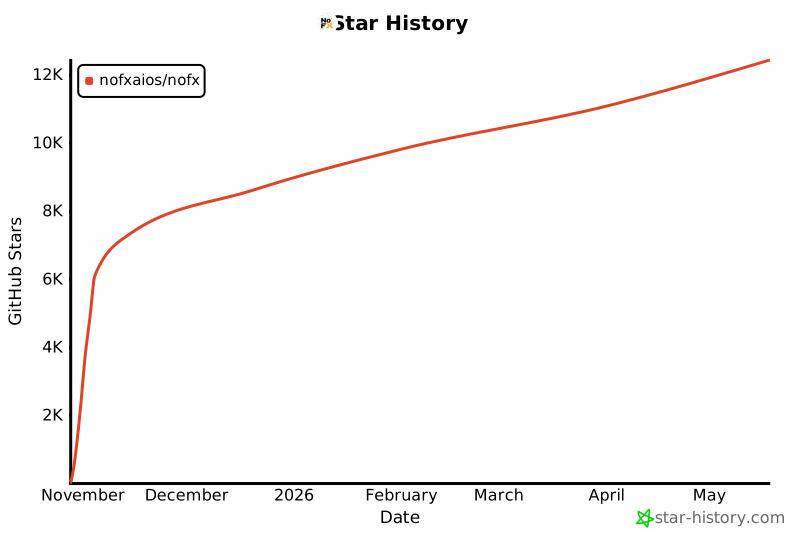](https://star-history.com/#NoFxAiOS/nofx&Date)
|